Just like the January meeting was, the February meeting was on the second Monday:
Monday the 9th
Don’t say I didn’t warn you!
Just like the January meeting was, the February meeting was on the second Monday:
Monday the 9th
Don’t say I didn’t warn you!

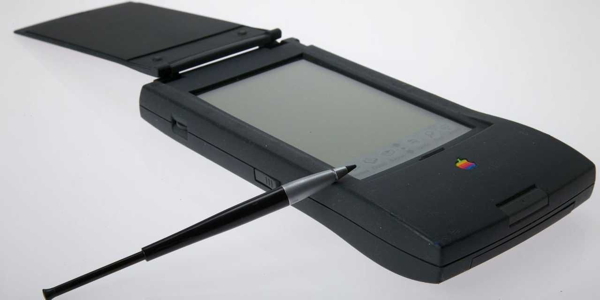
Don’t know about you, but I *really* miss the tight stylus-screen integration and excellent built-in handwriting recognition of the Newton.
Much to my great pleasure, it looks as if Apple just *might* be heading back in that general direction. Luke Domehl has a fascinating piece on Cult of Mac on an Apple patent, published today, that “…describes a stylus featuring built-in accelerometers, wireless transmission, and storage – with the aim of sending hand-written notes and drawings from one device to another.…” It continues:
The stylus can enter… data from a distance, such as from across the room, to the computing device. This allows a user in one embodiment to keep the computing device stored, for example with a cellular phone, in his pocket and still be able to use the stylus to enter text or drawings into the device. This makes it easy, for example, in a classroom setting for a user to take handwritten notes and simultaneously create a digital version of those notes. Additionally, in another embodiment, the stylus allows for the user to write on a whiteboard mounted on a wall and simultaneously display what he has written on a computing device.
PYBT: Smart iPad stylus could help Apple crack the enterprise world; I can’t wait!
Photo from the article
At The Sweet Setup:
Every week we try to post a new interview with someone about what software they use on their Mac, iPhone, or iPad. We do these interviews because not only are they fun, but a glimpse into what tools someone uses and how they use those tools can spark our imagination and give us an idea or insight into how we can do things better.
Today’s victim, er, interviewee:
My name is Jonathan Jensen and I run the Products team at a payments company in London. I’m interested in everything tech, especially in the mobile space. I’m fascinated by the convergence of payments and mobile technology, and of course I’m an Apple addict! You can find me talking about these things over on Twitter at @sevendotzero.
You can catch Jonathan’s complete story here: Jonathan Jensen’s sweet iOS setup.
“Back issues” can be found here: Sweet Setup Interviews.

Put computer security high on your new year’s resolutions list. As Rob LeFebvre observes on Cult of Mac, “…With all the recent hacks into private as well as corporate data — like the credit card grab from Home Depot and the hack into Sony’s files, there’s no better time to learn some of the things we all can do to protect ourselves.…”
Rob’s tips:
For the complete details, PYBT: Your biggest online security mistakes (and how to avoid them).
Photo from the article
by Lynn Wegley, InfoManager, with co-editor Fred Showker
What’s Here:
01 Another great year with you!
02 A bit of Christmas history
03 Geek Holiday Songs
04 Put The Words In Order To Solve Puzzles And Earn Rewards
05 Audio Switcher for Mac OS X – Menu Bar Applet for Managing Audio Devices
06 Top Mac Apps of 2014 per Apple
07 User Groups on Facebook for Week Ending 12/20/2014
08 First Movie-Maker App that Lets Users Add Video Stickers
09 Add Zoom Effect To Existing Videos
10 The Virtual Business Card That Exchanges Info Electronically
11 PDFpen 2 Embraces iOS 8 with New Professional-level Features
12 PhatWare Unveils Penquills: 2-in-1 Custom Keyboard for iPhones
13 Top 100 most shared articles of 2014
14 Quotes: Barbara Tober and Albert Einstein Continue reading
At The Sweet Setup:
Every week we try to post a new interview with someone about what software they use on their Mac, iPhone, or iPad. We do these interviews because not only are they fun, but a glimpse into what tools someone uses and how they use those tools can spark our imagination and give us an idea or insight into how we can do things better.
Today’s victim, er, interviewee:
I’m Dr Terry Portis, college director, psychology professor, reader and technology enthusiast. I manage a department that is made up of about 200 faculty and 4,000 students.
I also teach one face-to-face psychology class each semester, do some online teaching and curriculum design, serve on three boards, and teach adult Sunday School at my church. I do workshops and write articles for college faculty and administrators on doing better presentations, using technology to be more productive, and how teaching is impacted by aging and disabilities. The teaching and writing part of my life does not feel like work at all, I have fun doing it and sometimes lose track of time for hours. The administrative part – yeah, that feels like hard work (but meaningful).
You can catch Dr Portis’ complete story here: Dr Terry Portis’ sweet setup.
“Back issues” can be found here: Sweet Setup Interviews.
If not, you missed some old-timers, a great new feature (appleSTEMs), and the Board election (shame on you!).
At Coco’s, topics ranged from beg-a-thons, satellite radio, Microsoft ads, and delivery drones to dark chocolate chip cheese pie! and “standards”. And Jordi was back!!
That’s my story; I’m sticking to it!
At The Sweet Setup:
Every week we try to post a new interview with someone about what software they use on their Mac, iPhone, or iPad. We do these interviews because not only are they fun, but a glimpse into what tools someone uses and how they use those tools can spark our imagination and give us an idea or insight into how we can do things better.
Today’s victim, er, interviewee:
My name is Christine Chan, and I am a writer and editor over at AppAdvice.com. I cover reviews and news of iOS and some Mac apps on a daily basis. I also try to write for my own personal blog over at christinechan.org when I have some time, but that is few and far between.
You can catch Christine’s complete story here: Christine Chan’s sweet iPhone setup.
“Back issues” can be found here: Sweet Setup Interviews.
by Lynn Wegley, InfoManager, with co-editor Fred Showker
What’s Here:
01 ALERT: Bank of America Malware Phish attack
02 Facebook User Groups 12/13/14
03 iPhone InfoManager: A new iPhone, lots of apps, news and rumors
04 App Camp For Girls Seattle Finishes With Campers Pitching Apps
05 Free Set of Greeting Cards
06 MORE Fun apps for the kids and the folks for the holidays
07 An Oral History of Boston’s Rise and Fall
08 Save Call history to Mac or iPhone
09 Safenetting: The New Year Brings New Cybersecurity Challenges
10 NASA vs Macintosh ?
11 Steve “Woz” fun video
12 Lynn Wegley shared Chris Espinosa’s photo blast from the past!
13 Des Moines Mac Users Group (DMMUG)
14 Quotes: Steve Wozniak and Walt Disney Continue reading